Dictionary Idiosyncrasies

Since I switch between languages a fair amount I find it hard to keep track of each’s idiosyncrasies in common constructs. Presently I shall briefly note AS3′s implementation of Dictionaries, Arrays and Objects and differences therein:

Object

  • Maps String keys to Object values.
  • Features the convenience constructor {}
  • Access members with brackets or dots. Dots convert the argument into a String literal. For example:

    var bobby_b:String = "cello";
    var arrgh:Array = [];
    arrgh[bobby_b] = "uhn"; //equivalent to arrgh["cello"] = "uhn";
    arrgh.bobby_b = "yeah"; //equivalent to arrgh["bobby_b"] = "yeah";

    //post condition:

    arrgh["cello"] => "uhn"
    arrgh["bobby_b"] => "yeah"

  • Can lift (press) 10 tons

Array

  • Are actually associative arrays, as expected, so no speed benefit there.
  • Equivalent to Object. One might go so far as to say they are identical, if one was confident in this, but sadly one is not.
  • Feature the convenience constructor []
  • Probably semantically advantageous over Objects where strict lists will be used.

Dictionary

  • Maps Object keys to Object values
  • Can use Array syntax for addressing
  • Has no convenience constructor
  • Must be imported from flash.utils
  • for…in loops don’t understand Object keys – it always expects Strings – so one must cast the key to the desired type to avoid compiler errors:

    for (var key in new_edition){
    var member:Musician = key;
    // proceed with your life
    }

    NOT:


    for (var key:Musician in new_edition) { ... } //compiler error "Implicit coercion of a value of type String to an unrelated type Musician"

    OR:


    for (var key:Object in new_edition) { ... } //compiler error "implicit coercion of etc"

    BUT MAYBE:


    for (var key:* in new_edition){ ...}

    AND ALSO:


    for (var key in new_edition){
    key = key as Musician;
    // do whatever
    }

    AND ALSO MAYBE:


    for (var key in new_edition){
    //and just don't even bother with the cast, they'll figure it out
    }

    That last one is nice for typing, but not nice for typing, if you take my meaning. Kinda defeats the purpose of the kinda-type system they so painstakingly (?) crafted. Recommendation: use the first form with an explicit cast and an extra variable so you get the benefit of the compiler.

  • Cannot by typed correctly by me on the first try. I always write “Dicionary”. Can’t stop.


More Audio Woes

TL;DR at end of post if you want to skip my nonsense.

Here’s something that almost made me tear my laptop in two like a phone book.

I’ve moved to a lower-level sound model so I can have sample-accurate control. I’m still using two bar phrases which need to be connected together seamlessly; the overhead in the typical Sound.play() model was causing a several ms hiccup which was unnoticeable to the human ear but threw timing off disastrously. With the lower level model, the algorithm looks something like this:

function processSound(event:SampleDataEvent):void {
	var bytes:ByteArray = new ByteArray();
	var numSamples:int = 0;
	var startSample:int = -1;
	while (numSamples <= BUFFER_SIZE){
 		var samplesRequest:int = BUFFER_SIZE - numSamples;
 		numSamples += _currentTrack.extract(bytes, samplesRequest, startSample);
 		startSample = 0;
 	}
 	event.data.writeBytes(bytes);
 }

Note first of all that the actual .as file has an additional 42 lines of explanatory, questioning, soul-searching comments and debug statements, excised here for your benefit. The idea is simple: we fill a ByteArray with up to BUFFER_SIZE samples (8 bytes each: 2 x 32-bits representing left and right channel), then go back to the beginning if we need more, and so on.

Problem Number 1: First of all, let's say you read the last remaining 1987 samples in the Sound. You loop, and ask for an additional 6205 samples. Flash gives you 6204 for some reason. So you loop again and ask for 1 measly sample. Yet stingy Flash gives you 0. And you loop again and again and again and again okay we get it, that's great, we get it. Why?

After some debugging I found that Sound.extract() would only return a number of samples that was a multiple of four. So 8192, 8188, 6204, 4, etc. Okay, the fix for that is simple, if stupid: just buffer a little less than BUFFER_SIZE if you don't get within 4 samples of it. That means your buffer isn't quite up to size, but that shouldn't really affect anything, especially since we're working with a large buffer. So you can do

while (numSamples < (BUFFER_SIZE - MINIMUM_SAMPLE_REQUEST)){...}

and you should be fine.

But you're not fine, you're still screwed, because of:

Problem Number 2: when you add your 6204 bytes to your 1987 bytes and write that ByteArray to the sound stream, you get "RangeError: Error #2004: One of the parameters is invalid", which error message, of course, is enthroned in the great pantheon of Really Helpful Error Messages Thank You Very Much. Like, not even maybe a stack trace? Or, like, maybe mention who didn't like the parameters? Or, get this, which parameters? If I had a little more time I would point out that there are thousands of parameters being passed around the program, only some of which I'm privy to, and in fact I might, if I had the time, calculate the efficiency at which one could approach figuring out which parameter is invalid and that it is, in fact, rather poor, and also could then extrapolate that to estimate the time spent by your average programmer trying to figure it out and show with some rigor that that time is measured in hours, not minutes, and in fact may bleed into the lives of other good-hearted programmers on various StackExchange-like message boards who unwittingly may try to help, and could furthermore argue, if one thinks about it, that all of these man-hours have a cost, financial and otherwise, inasmuch as some involved may be gainfully employed but more importantly time spent on this earth is sadly finite and has an innate value of its own, and that all lives born up in this travesty of an error message are irrevocably shortened and made worse by it, and I might conclude that the true cost of this error message is not measured in money, nor man-hours, nor inefficiency, but rather human tears and despair, but no, there is unfortunately no time for that analysis to be done, I'm afraid.

Instead I determined the error was coming from event.writeBytes(), which was receiving way way too many bytes of samples. Like, four times as many. Exactly four times. But it's stranger. If you read BUFFER_SIZE samples correctly, the ByteArray ends up being correctly sized (BUFFER_SIZE * 8 bytes). But if you reach the end, and Sound.extract() reports it wrote 1987 samples, if you check the ByteArray it really received 63584 bytes, which, if we were in sane-happy-land, would be 7948 samples. But we're not in that fabled land where things work like you expect them to and it's safe to make certain assumptions, so we don't know which it is: did we actually get more samples, or did all of the samples take up 32-bytes (!!) each, or is it a misreporting, or is this all just a dream and when I wake up I'll be in sane-happy-land, or is the land you wake up in even worse? The possibilities are too fearsome to contemplate, and getting to the bottom of it - I supposed by looking through the byte array, or analyzing the sound produced - are beyond the scope of my life.

Things were looking grim for our hero. On a whim I thought, what if there's something wrong with the file? I produced it with professional hardware and software but maybe there's some kind of error that's killing Flash and me slow. But before checking the source I went into Flash Professional and messed around with the encoding of the file, changing it first from "Default Encoding" to RAW, stereo, no compression. And it worked, flawlessly. It even extracted odd, non-multiples of four numbers of samples. So I tried choosing another encoding: MP3 160kb/s 44.1 stereo, and that worked as well. Then I started writing this blog post, later still you started reading it, and here we are.

I don't know exactly why the encoding might cause such a strange thing: generally correct extraction until the end of the file when you get QUAD DAMAGE or something. And that's one of those things I'm just going to file under things-i-don't-even-want-to-know-the-answer-to-i-just-want-them-to-go-away and hopefully there it shall remain evermore.

TL;DR: Sound.extract() may report an incorrect number of samples read as its return value if you reach the end of a sound file that is encoded in a certain way for yet undiscovered reasons. Solution: re-encode the file.

The Kitchen Sync

What genius he employs in selecting titles for posts! Bravo!

I.

Notes on syncing animations and sound in Flash.

  • Pause/Resume: There’s no way to pause a playing sound, only stop it. So to pause you have to store the time at which you stop it then when you want to unpause you start the sound playing at the given time. Great (?), but apparently Flash isn’t real concerned about coming in on time, so it may start a few ms early. Which wouldn’t be a problem unless you were counting on your next update happening after the previous update, in which case you’re plum out of luck. In my case I’m doing a calculation to see how time has passed in a looping sound. If the current playhead position is less than the last checked  position then I assume the sound has looped and calculate accordingly. If, say, the current position = last position – 1, then almost an entire loop has gone by, which information is then used to update animations, which as you may imagine makes things really fucking wrong. The solution I used was to wait to do any updates until the stored pause position is passed, then reset the pause position to 0. But I’m not real happy with that and I’m hoping as I learn more a better way will be revealed.

II.

Here’s an attempt at a summary of what I’ve learned from a magnificent post at reddit (who knew it was possible?) about syncing:

  1. It is possible to make a good rhythm game with Flash. I was already coming to this conclusion, but it’s good to see another project (TREBL: Rhythm Arcade) that uses it well.
  2. We need a way to do audio and video calibration. Audio is more important, since that is (hopefully) what the user will use to aim for notes. In a video showing calibration from Rock Band creators Harmonix, the audio adjustment is under 10ms. Video adjustment is < 100ms (!) on a large TV. I don’t know yet whether it’s fair to generalize those figures or not.
  3. Audio position isn’t guaranteed to update regularly. It will more likely update in a step-wise fashion, ie. it may produce the same number multiple times in a row then jump to a larger number but on average will be correct. This corresponds roughly to what I’m seeing in our initial demos, where notes jitter a little bit. I will note that our jitter is very minimal, though, and is not noticeable at smaller sizes. Of course that is n=1, though, and the results are likely to be highly variable dependent on the audio hardware and drivers.
  4. Here’s his block of code for determining song time:
    songStarted() {
        previousFrameTime = getTimer();
        lastReportedPlayheadPosition = 0;
        mySong.play();
    }
    
    everyFrame() {
        songTime += getTimer() - previousFrameTime;
        previousFrameTime = getTimer();
        if(mySong.position != lastReportedPlayheadPosition) {
            songTime = (songTime + mySong.position)/2;
            lastReportedPlayheadPosition = mySong.position;
        }
    }

    Analysis: when we update at 60 times/second, check to see if the song position has been updated. If it has, average it with the internal song position that we’re keeping. The internal song position is updated based on the more accurate getTimer(). But of course it’s likely to drift away from the recording, so averaging them together keeps them in check. Question: is it still possible to drift away significantly? Let’s say mySong.position updates only every 100ms or so. And maybe our internal counter has a constant drift of 10ms per 100ms. The first update the song is at 100 but we’re at 110, so we compromise at 105. The next update the song is at 200, the internal is at 215, so we get 207. Then 300, 317 -> 308. 400, 418 -> 409. Seems to me it will just keep increasing, if that drift is a constant, which is kind of a big question. So that bears looking into.

  5. Delays to be concerned with: audio processing -> speakers -> ears (sound in air is like 1ms/foot). Key press -> listeners in program. Graphics -> screen. As discussed before, graphics are probably the largest. Audio less so but most important. Key press registration delays are probably minimal if you use listeners. Hard to separate it from audio/visual delays in a calibrator. And if you use two separate calibrators then you may be including key delays twice. Accounting for it may take fiddling (read: uninformed hacking about with the numbers).
  6. Question: for a calibration tool, could you have a simultaneously playing audio click and visual flash and the user adjusts a slider to line them up? Then we have an idea of when they perceive things to be simultaneous, or the relative delay between sight and sound. Note it does not tell you when the user perceives it, so it’s not a complete test.
  7. In the calibration process we may also have to deal with user interpretation, ie. they may play a little behind the beat or anticipate it even when focusing intently on a simplified calibration task. In the Rock Band vid they did automatic calibration with a tool built into the guitar which is neat but we don’t have that luxury (and plus, WHO CALIBRATES THE CALIBRATORS?)
  8. This isn’t in the article, but I’m going to assert that calibration tests should be done at the indifference point, around 96bpm, a tempo where people tend to not anticipate too much and not drag too much (according to Vierordt’s Law, which I don’t really know if it’s true or not).

Resizing difficulties

I’m trying to get a handle on resizing madness in Flash, discussed in previous posts. Here’s what I’ve learned.

First, one must think of Symbols in a particular way. Before my mentality went like this: create a shape object, Modify -> Convert to Symbol, now the shape is a symbol. This is, I believe now, an error in the mental model. Think instead of the Symbol as a container. It can hold a shape, or another Symbol, or some number of those combined in different ways. A better way to construct symbols would be to use Insert -> New Symbol to create a blank symbol and then draw inside of it. I think the result will be the same, but this way enforces the mental model.

Next, I was confused and angry about object dimensions and scaling when resizing. Let’s say you draw a rectangle and you aim for 100 pixels by 100 pixels. But since you’re human you miss and make it, oh, let’s say 112x112px. Easy solution, right: select the object, enter the correct size in the width and height text boxes. But if you then look at the transform panel you’ll see that the actual width and height haven’t changed so much as a scale transform has been applied. So now the shape is 112×112 scaled by 89%. Maybe this wouldn’t make you angry, but it sure tied my shoelaces right up. A needless level of complexity added needlessly, which of course is SOP for adobe. But I was being tricked yet again, as explained in a post which is not useful to me really except for the following passage:

Flash resizes merge-shapes on an absolute scale as long as the shape remains selected. Deselect the shape, and the current width and height become the shape’s new 100%.

Which means that all one would need to do is deselect the object and it fixes its numbers up. But wait!

Flash always resizes drawing-objects, primitives, text fields, groups, and symbols on an absolute scale (applying the percentage you enter into the panel to the element’s original size).

Merge-shapes are shapes drawn with object drawing mode disabled, and drawing-objects are shapes drawn with object drawing mode enabled. Modal operation is always a good thing, right? So object shapes resize differently than merge shapes. Can you see why I might have been confused?

Now, this is abysmal, but livable for the following reasons:

1. Functionally they are equivalent. I hate this reasoning, so let’s move on to

2. The types of things we will be turning into symbols are typically not just simple shapes. It doesn’t make sense to me to scale a rectangle, which can be described entirely with just two numbers in the first place. But for a more complex drawing it makes more sense (although technically still not forgivable in my mind yet). And,

3. The scale of the objects inside a Symbol is different from the scale of the symbol itself. If there’s a 112px square scaled down 89% to 100px inside a Symbol, that Symbol is 100px at 100%. If you change the size of the stuff within the symbol, the Symbol should take on that size. You should only have to worry about Symbol scale once one is placed on the Stage.


“If you’re not burning with rage, you’re not learning computer skills”

Code Duplication

I’m running into duplication problems that seem to be inherent to Flash itself. Here’s the deal:

We have 5 player characters which have been designed in Flash Professional. As of now they are just colored blocks (“why do they gotta be colored? That’s racist”). These characters obviously share certain properties, like for example HP, MP, that sort of thing; that’s not a problem for the most part: I can simply have each PC class extend a base class that has those properties and they’ll inherit them just fine.

That’s great for properties that you can define in code, but what about shared properties you want to design within Flash Professional itself? For example, as a temporary element each PC has a text box which they can manipulate to say certain things: e.g. “Ouch,” when nailed by a ninja star. This is the kind of thing that we don’t want to duplicate so we would keep that text box in the parent class; but there’s no way that I know of right now to extend a parent class and work with it inside FP. You want to be able to extend Library objects, basically.

Thinking off the top of my head, maybe you could achieve something like this by combining different Library objects which each have their own code. If you properly nested things each “child” (really a compound of sorts) the code duplication would be small. However the whole concept is still rooted in duplication – you have five classes that must contain all the same elements; in fact the duplication just moves into FP, which is worse in a way.

Another way might be to have a single PlayerCharacter class which contains all the necessary design stuff, then skin each instance with a certain set of animations. This might make the most sense of all, if such a thing is possible or I knew what I was talking about here.

The solution that I’ve adopted now is to abstract out as much as possible and duplicate as little as possible. So in the case of the message boxes, the parent class has a method say(String) which gets called in all the appropriate cases; that method in turn calls another method say_internal(String) which is a stub in the parent class but which each child class can override. (Note that method names have been changed to protect the innocent – I’m not really sure what the proper naming here would be.) Thus to make the text appear in the box we’re only duplicating a few lines of code:

override function say_internal(str:String):void {
statusText.text = str;
}

That’s not great, but it does save us some implementation work. The real question I don’t really know yet is how big a problem this is: my example is contrived and temporary. What are the real, lasting situations in which this issue might arise?

Wat

It’s now become clear that I have reached the point in Flash Pro where I don’t know what the fuck is going on and I won’t be able to continue until I figure that out. I mean, to the basics, and no progress should be made until I get there.

I just spent an hour trying to figure out some bug I thought was of my own creation, only to realize that my entire fundamental understanding of what was going on is totally incorrect. Each Ninja gets placed in one of five lanes, one per player. In order that Ninjas in the same lane don’t overlap one another completely I introduced some randomization to their y position. Unfortunately some Ninjas were appearing outside of their given lanes; I spent some time debugging it, going over the randomization code and working through the math over and over.

It didn’t make any sense, until I checked things out in FP. Then it made even less sense. The sizes of all the characters are supposed to be 76px, but they’re all actually 80px tall scaled down by some percentage. Worse, each lane is supposed to be 86px high, but they’re being reported at runtime as anywhere from 170-190px. I can’t even find those numbers in FP to even start to make sense of them.

Trying to remove the transforms – scaling in this case – on the ninjas is totally ineffective. So… do you have to draw it the exact right size the first time, otherwise you’re screwed? I just want to change the size of a fucking square, you know? I don’t even know how to approach the lane height problem, since I can’t even see where the error is coming in.

Maybe I should be using scaleHeight or some other such thing at runtime? But really, this just points to my fundamental non-understanding of what’s happening in FP. So any further hacking around in FP or code is only going to fuck things up more. It’s time to sit down and do some hard core reading.

Stuffs

Various Notes

MovieClips don’t get any ENTER_FRAME events until they are added to the stage (via an addChild() or something to that effect). Makes sense.

Layer Carnage

Something that really drives me nuts about Flash is the inability to interact with layers in ActionScript. And before anybody gets pedantic and says that’s mistaken thinking, unask the question, l2flash, git gud or anything like that, yes, I understand (I think) the design choices that make this the ‘wrong’ way of thinking, but I still think it’s stupid.

My understanding is that layers are purely design-side elements, and that once your flash gets exported they’re gone and it doesn’t make sense to try to interact with them at runtime. Okay, I can see that design decision, and fine, you want to be consistent, okay great you win the consistency prize. But as a programmer/builder of interactive things, I want the ability to put objects on different layers at design time and runtime, and that’s just not possible. It doesn’t make intuitive sense that layers go away at runtime. You can place, say, a square on the stage, give it a name and then move it around at design or runtime. Yet layers go away? Why can’t you just name them and they become Sprites or something?

One solution is to create a Sprite for each layer you want when your Engine initializes, then add all your objects to the appropriate Sprite. Which is a fine solution except that it completely sucks, since you have to duplicate your layer structure in code, so hooray we get to build everything twice, what could possibly go wrong, oh and also that will all be on top of the stuff you built in Flash Pro itself, so have fun manually reordering things, or you build it once in code and can no longer design anything in Flash any more. Either way it sucks.

The better way is to add an invisible/size 0,0 display object of some kind at the origin of the appropriate layer, then add stuff in code to those display objects. Of course event the most cursory examination of this method reveals it’s a total hack, but all the same it’s a much better solution: it gives the illusion that layers still exist – each created display object exists at the proper z position already and so it’s like the Sprite solution except sensible.

This is how I solved the problem in the first flash test game that I made; unfortunately that code is miles away and I don’t have access to it, so I’m fumbling trying to recreate it. Do you just place like a square at 0,0? But if you make the size 0,0 or make it transparent Flash just destroys it (…why? Can we not have invisible or infinitely small things?). Kind of dreading the internet search that is to follow.

Okay, 30 or so minutes later the solution: create a new MovieClip in the library and put an instance at the origin of each layer. So I did:

  • Insert –> Symbol…
  • Call it Layer
  • Drag it onto the stage on the proper layer; manually set x and y to 0
  • Name the instance – in this case I went with layer_projectiles

There’s a lot of debate on variable name prefixes. Many hatefully oppose it, but I’m going to justify it like this: AS isn’t exactly strongly typed, so it’s not like I’m saying

int __int_myInt; // an integer

or some shit like that. Prefixing with layer_ will let me organize mentally better than just projectiles, enemies, etc.

WordPress Categories vs. Tags

As I’m going to categorize/tag this post I’m looking at my options and thinking two things:

  1. I don’t really know what the difference between tags and categories is
  2. So far my choices for categories are ActionScript, Angst, BS, Development, and FMB. Well, all of those categories apply to this post, and every post I’ve yet made. In fact it’s pretty safe to say every post about FMB Development will indeed involve much Angst about ActionScript BS.

So: TODO figure out difference between cats and tags and use them appropriately. Also write about happier things.

Keyboards

For typists, and programmers especially, the right hand pinky finger is ridiculously overused. Unless you rolled a natural 18 DEX it’s absurd to have to type things like:

p0["'>:-0'"] += ‘{p}’;

Especially considering the number of backspaces one will probably need to employ along the way. So I always move my hand when sequences like this are required – which is just about every line of code. But that’s horrible, because then your hand shifts out of home position and chances are you’re going to come back wrong, slowing you even more and making more mistakes.

Furthermore, look at your keyboard: chances are the keys are staggered so that each row is shifted to the left of the row directly below it. This makes sense for the right hand, because it naturally comes in at an angle from the side of your body to the keyboard; to hit the proper key with the proper key you extend the finger forward relative to your hand. But for the left hand it’s disastrous. Your choice is either a really unnatural finger movement, or a horrible wrist position to accommodate a natural finger motion.

I’ve seen keyboards that don’t stagger their rows, but this alone is not sufficient to solve the problem – you need to then tilt the keys to face the hands properly. On a laptop this becomes absurd. Why not stagger the two sides of the keyboard oppositely, then move some of the pinky punctuation keys to the space in the center that opens up? Why has nobody done this yet?

Trigonometry

I’ve done this so many times and each time I have to mega-think my way through it all over again. And I always do it wrong the first time, then the lights dim in the room as I power ponder the solution out. Given that I’m going to forget it the next time I need it, I’ll leave some notes here.

So a ninja throws a star at a dude. That star follows a trajectory that describes the hypotenuse of a triangle with a and b sides equal to the difference in x and y positions start to finish. The star has a velocity which we’ll express as the number of pixels it can move in one second, which will be some percentage of the length of the aforementioned hypotenuse. We’re interested in knowing how far the star will travel in the x direction and the y direction each second.

We need what I’m calling a unit vector, and it can be expressed in a couple ways. We could do it with just an angle and a velocity, which is really easy and vector intuitive. But we need to apply the change in x and y 60 times a second, so we don’t want to make the calculations to translate that vector into its components over and over again. So the better way is reduce it to it’s components once then work with that. (Note that if the momentum changes over time, due to say friction or whatever it would be useful to keep the angle and magnitude around because we will need to make those calculations every time.)

The easiest way to express the unit vector then is as a single point [x,y] which represents the distance from the origin the star can travel in a second. So if our momentum is [3,4] the star will travel (using graphics orientation) 3 pixels to the right and 4 down each second. (Incidentally the total velocity in this case, as we all know, is 5 pixels/second and the angle is… something, whatever, who cares.) Here’s the bit of code that works this out:

var adjacent = target.x – tosser.x;
var opposite = target.y – tosser.y;

// TOA: tan(theta) = opp / adj ==> angle = tan-1(opp/adj), so:
var angle = Math.atan2(opposite, adjacent); //angle will be in radians, as required

momentum = new Point();
// CAH: cos(theta) = adj / hyp ==> adj = hyp * cos(theta)
momentum.x = Math.cos(angle) * velocity;

// SOH: sin(theta) = opp / hyp ==> opp = hyp * sin(theta)
momentum.y = Math.sin(angle) * velocity;

Goddamn it’s late.

Fucking WP

Jesus god is WP ever monumentally failing me right now as I’m trying to put code tags around my code.

Release 0.0.1

Meeting

Had a Skype meeting with Sean. Agenda: progress report, discussion, next steps, these goddamn kids these days, Fumie Abe, video games, slow emotionally crushing death in the cold black of space, etc., etc.

For some reason internet at my undisclosed location was malfunctioning: going to google.com would redirect you to yahoo.com. Google hangouts didn’t seem to like that, although Skype seemed to work. Don’t know what’s up with that, but it’s every device in the place, which indicates some problem at the ISP or the router to me. Some malicious Yahoo hack attack? Marissa Meyer getting revenge (for what?), one household at a time? Who knows!

Release

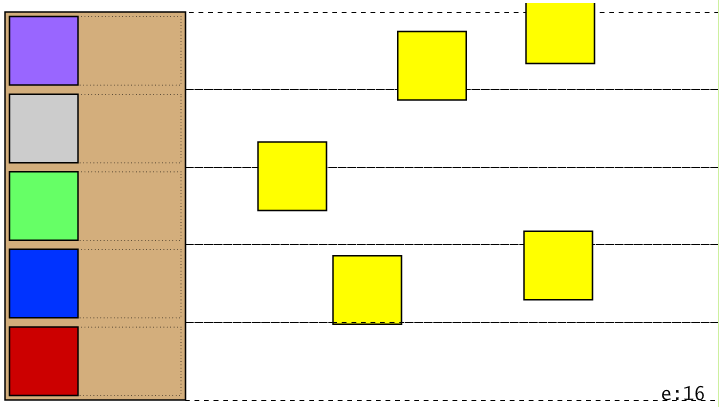
Not like we’re actually releasing it in the sense that anyone will ever see it, but this is the state of version 0.0.1. Observe the viewing globe:

(note: don’t insert images at the top of a WP post, or apparently you’ll be sorry)

We have a stage on the left, with five players (the various multi-colored squares at the left (from top to bottom Funkmouf, Gravelthroat, Leper Skinz, Bass Boy, Frank (colors based on their background colors in FMB media)), who are charged by ninjas (the yellow squares) distributed across five lanes. The ninjas currently have a chance of trying to attack with ninja stars, though they are sadly unable to follow through just yet.

Mechanics

Q. Does the concept of lanes make sense? As of now all enemies and players are locked to a certain lane, Plants vs. Zombies style. I suppose enemies in a band member’s lane could only attack that band member. The other options is to have enemies have unrestricted movement and arbitrary targeting. If we go with lanes, should we have a mechanic to reposition band members? Enemies that can move across a certain number of lanes?

A. Just go with lanes for now.

Sean worked on the story, which is on Google Drive, which I am unable to view because of this crazy internet clusterfuck that’s going on now. But we went over it a little bit and it’s sounding pretty good.

Q: Should we introduce strategy element? Like a resources management kind of thing, getting to the next gig, playing solo/smaller gigs to build up pimp buxx, etc.?

A: maybe? But we probably need to focus on one gameplay element at a time. Let’s plan to get the storm-the-stage thing working first, then see if we can introduce additional gameplay elements once we’re feeling pretty good about that.

OR if we have a really solid design, we could get to work on it. But for now we’ll work on the basic stage gameplay and see if we can get a better sense of things from research and experimentation.

Game progression

Maybe we could start out with the band separated, have to get them together? Then battles start with one player (FM), then find another player. This works as tutorial plus difficulty and complexity progression.

Maybe that’s the first 1/3 (or less?) of the game, then the rest is take-over-the-world kinda thing.

It could either be the band origin story (which Sean already has worked out), or they can start the game artificially separated (through trauma/nefarious schemes of Dick Dangerous?)

Then does the resource management thing get introduced immediately, with just one band member, or at a certain point as a surprise-we-do-this-too mechanic, ala ADR?

Plan

Rich: Get gameplay working good, forget all the other stuff. Get enemies attacking, then players attacking.

Sean: Work on story narrative, flesh it out, look at Flash.

Both: Read over flash game development article in depth, absorb it, accept it, embrace it, investigate its links.

Goddamn Kids

http://www.youtube.com/watch?v=lSJyNiHDx94

Turn your volume down before clicking this link

Next meeting

Sunday 27 oct 2013 4:30 ET

12oct2013

Flash Animation Pain

Apparently I’m still struggling like a base villain with Flash animation principles. Before I go into it I’ll note the solution and very basic principle I learned so I won’t need to plow through a goddamn epic to figure it out again when I’ve forgotten it:

Symbols (eg. MovieClips, etc) are containers for objects and other Symbols and stuff. Symbols can be animated/tweened, but base objects cannot. When you convert something to a symbol, then open it and try to animate it, you can’t because you’re inside a Symbol trying to animate an object; can’t be done. You need to convert that object into yet another Symbol in order to do the simple shit you had in mind.

It’s a bit like the homunculus problem – if your consciousness is like a little man inside your head telling you what to do, who’s inside his head? Etc etc, we get it, that’s great, we get it. In other words, it’s a mess.

I wanted a spinning ninja star. So I bumbled my way through the basic design and creation of a four-pointed star, heroically using not-object-drawing mode (unheroically forgetting what that’s called at the time of this writing) so I can easily combine the body and edge together and pull out the hole. I thought I was so clever. Took me a while to get the gradients thing figured out. Also ran into a problem where I drew the interior of the star then tried to modify the gradient (specifically: the shade of grey on one end by setting the brightness) but each time I set it Flash would set the value back to the original value but change the way the gradient looked anyway. Didn’t spend any time looking up why the F that would happen, since the answer would likely make me mad, like why can’t they just make something that works, or if that’s how it’s supposed to work at least make it look like that’s how it’s supposed to work, see I’m a little angry about it anyway, dammit Adobe can’t you hire at least one competent UI/UX person? But that’s not what I’m here to talk with you about today.

I got the basic thing down, converted it to a Symbol with a MovieClip base and wrote stub classes for it. Then I figured I would animate it, so I opened it up and tried to create a tween and was rewarded with this message:  ”The selected item cannot be tweened. You must convert this to a symbol in order to tween. Do you want to convert and create a tween?” With the options “OK” and “Cancel” which every two year old knows are not the proper set of answers to that question, goddamn it that’s fucking basic shit isn’t it? Sorry, sorry. A google search found the answer. In case that page goes away, here’s the relevant quotes:

… each movieclip is like a scene. They have their own timelines. Motion tweens can be applied to objects, not simple shapes. So when you enter inside first clip, you now select the shape inside it. Thats why it asks to make it a clip again

and

… you may only tween a symbol. … This is just how they designed flash. Flash only knows how to tween “symbols”.

… when you double click [a created] symbol in the library, you go “into” the symbol. Inside there you’re right back where you started, looking at the image you imported, which is not a symbol. Again, you cannot tween that image,  you must again convert it to a symbol before flash can tween it.

If you intend on making encapsulated animations like you seem to be, yes, you will end up with 2 symbols (or more). One that contains the overall animation, and another symbol for each asset inside it. You then toss your container symbol on the timeline as you did and you will see the animation, as you’ve found out.

Why are quotes in this wordpress theme so goddamn big?

Anyway there’s the solution: convert the interior stuff to a symbol, an instance of which is then inside your container symbol, then animate the interior. Which kinda sucks, cuz now there’ll be two ninja star symbols hanging around inside the library which is non-obvious and confusing.

It actually raises another more important question, which is somewhat related to object oriented design: where should that animation happen? Does the world/stage control the spinning of the ninja star, or is that inherent to the star itself? I think it’s a pretty easy answer in this case – having the stage spin the star is laughably cumbersome – but it could presage more difficult design questions in the future.

Time spent on this simple crap: about the length of the special edition of Ghost – Infestissumam (1 hour)

More Learning by Badly Doing

Here are the proper steps, learned the hard way, for animating a rotating object.

  1. Insert -> Motion Tween
  2. Set the tween to the proper length (I chose 40 frames, which in 60fps means 2/3s)
  3. Select the first frame of the tween, which means first deselecting the whole tween which is non-obviously selected and non-trivially deselected.
  4. In the properties panel, under rotation, choose a direction
  5. There should be a keyframe at the final frame of the animation. It should be identical to the first frame. This is bad; when we loop, there will be two identical frames in the sequence, which may not be noticeable but why not do things right?
  6. Select the next-to-last keyframe. Insert a keyframe there. The object should be almost fully rotated.
  7. Select the final keyframe. Right click -> Remove Frames. It should loop correctly

Note that the animation is now 39 frames long. So that’s maybe undesirable. But the solution isn’t to stretch the tween, because the distance from the final frame to the start point will then be slightly longer than every other frame, but to start out with 41 frames in the first place. Would have been nice to put that information in the proper steps, right?

Source for some of this info, though it may have annoying advertising.

After all that I have a spinning ninja star (which, aren’t they a pop invention and historically inaccurate? Whatever), although it’s all wrong, because the gradient, which is a simulated lighting effect, rotates along with the star, which is pretty ignorant. What’s the right solution? An overlay on top of the star? Bah, doesn’t matter now; it’s something to handle when we’re trying to do animation for real. Should probably have more of a hand-drawn look anyway.

Tidbits

Overriding functions: you must use the override keyword to override non-private functions. The declaration must match exactly; no, you won’t get any help from the compiler.

toString(): the documentation I found was outdated; you need to use the override keyword:

public override function toString():String { ... }

The ConstruKction of Shite

I just did something that’s… weird… man, and I don’t know how I feel about it. So PlayerCharacters and Enemies will need to be able to talk to the game engine (class Engine, which is the main class of whole #!), because they’ll need to interact with the world, Ninjas will throw stars, etc. So you could pass a reference in when you construct them, which is probably how I would structure it in Java, which works but like who wants to do all that work. So I tried having a static instance of Engine within Engine itself, and setting it at Engine construction time, then having a static function getEngine() that returns that static instance, or null before construction, but when is that ever going to happen, like, what could possibly go wrong. Kind of like singleton pattern, but… weird. And… it works. But it shouldn’t, right? Because shouldn’t you not be able to set your reference in the constructor, because it hasn’t been constructed yet? I would have done it the traditional way, by constructing it at first call to getEngine(), but that’s impossible because Flash instantiates it itself. So… weird, right? But it seems to work. It bears further investigation.

(1.5 hours later) Okay, I have some some answers, and my understanding is now Good Enough™ to go on. The first reason it was weirding me out is Java-based – you don’t want to go passing this around until the object is fully constructed. Could be Dangerous. In this case, I think that’s mostly okay, since all we’re doing is grabbing the reference, which in the limited testing I’ve done seems to check out. The other reason is it’s like a violation of OO. If you make things statically accessible, then really you’re just moving one step closer to procedural programming, and you’re only using classes as namespaces, so why bother with OO in the first place. Steve Yegge wrote a big attack on the Singleton pattern which makes this argument quite strongly. I don’t totally agree with it (which has the side effect of making me feel inadequate as a programmer incidentally – his rhetoric amounts to “if you disagree with me you have no chance of working for me; if you agree with me I’ll hire you”), as you just need one case where you’ll only ever need a single instance of an object (eg off the top of my head, a game engine) to make singleton a valid choice. So I think his case is overstated, and he seems to admit to that to in the classic “these statements not intended to be factual” parenthetical manner at the end of his post but what the fuck this isn’t supposed to be a review of a fucking Yegge blog post.

I found some answers on StackOverflow that indicated a static instance set in the constructor is valid, so that’s good enough for me for the moment. So it ain’t pretty, but it looks like it’ll work. Anyway, long story long, that’s how we’re doing it and it’s off to bed for me.